How I booked 30+ conference meetings with AI
As a busy founder, I barely see genuine content on how to use AI to 10X the non-coding part of my work. Everyone is boasting about how amazing Openclaw or Hermes are, but all examples I see are either too simplistic (e.g. tell me all meetings I have today) or written by influencers or people who want to sell something.
Recently Checksum participated in the AI4 conference. It was an extremely successful conference for us with many demos booked for the weeks following the conference.
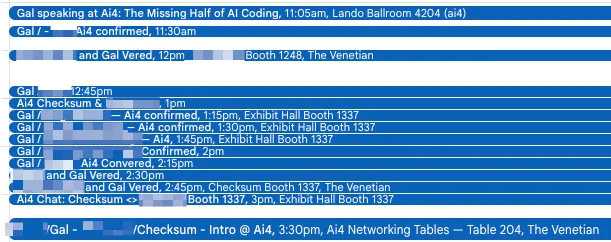
In the weeks before the event I set myself a goal - fill my calendar with relevant exec-level meetings. I fully used AI (Hermes) and spent maybe 3 hours on the entire thing. This is how my calendar looked throughout the conference.
The process I followed was very simple and has become my regular AI workflow for hands-off tasks.
Gather context
First I needed to get the list of all participants. AI4 provides this list over a webapp. I connected my Hermes agent to my browser using browser-use CLI and asked it to reverse engineer the API and then export all participants to a CSV. I asked my agent to save the CSV to a project folder so it persists across sessions.
Next I defined five attributes to prioritize the list. Three were about the company - size, industry, and whether they have a complex web app as a key component of their product, and two were about the person - title and test aptitude. I wrote down the attributes in a markdown file in the project directory - again so it persists across sessions.
I also have a skill that explains how to talk about Checksum, who our ICP is, what our offerings are, etc.
I asked Hermes to use Exa to gather information about every participant in the list.
Alignment
Once I had all of the context - the list, instructions on how to prioritize and info about Checksum and our messaging, it was time to align on the task.
I asked Hermes to launch a subagent and classify the first 30 people in the list. I reviewed the classification, provided feedback and iterated with Hermes on the classification guidelines, until the subagent was able to classify the list correctly. As usual, I saved the guidelines to a markdown file. Then Hermes ran 5 subagents at a time, each agent classifying 30 people, and repeated until the entire list was classified. I sorted the list by rank and decided on the 200 people I’d like to meet at the conference, and extracted them to a separate CSV outreach.csv.
From there, I needed to define how I want to reach out to these people. I decided on a 3 channel cadence:
- Send a connection request on the AI4 app + a LinkedIn request
- If LinkedIn approved, write a LinkedIn message - proposing to meet at AI4, with an email follow up (enriched with Exa + connectors) after 2 days and another LinkedIn follow-up after 4 days
- If AI4 app approved, do the same thing but replace LinkedIn with AI4.
- For anyone who replies positively to meet, send them a Calendly link to book a 15 min meeting and a meeting request on AI4 (if they approved on the app)
That’s it - that was the cadence.
Then I wrote what I call a RUNBOOK.MD
This is basically the loop that the AI will do. The RUNBOOK included
- Reference to the CSV of attendees.
- Definition of the cadence I’m after
- Clear instructions on how to execute the cadence
It looks like this:
When I ask you to run the RUNBOOK, follow the below
- Read
outreach.csv - Choose the next batch of people to start the cadence. For each one, use
browser-useCLI to send a connection request on the AI4 website, then useGojiberry AIto send a LinkedIn connection request - Change the people’s status to
First Request Sent - Then for every person already in sequence, perform the correct next step according to the cadence.
- If
Connection Sent, check on Gojiberry and the AI4 website if we received approval. If so, send the first message in the cadence and change status toFirst Message. - If
First Message- check if they replied. If so, send the post-reply message and change status to “replied”. If no reply and enough days passed, send the follow up and change status toFollow up - etc.. etc…
- If
- After you are done, send me a report
- How many people at each stage of the funnel
- How many meetings booked and with whom
- Key movement
Essentially I instructed AI exactly what to do.
Important note: I wrote the RUNBOOK by hand. You want to make sure you provide very clear instructions that leave no daylight.
RUN
Once I had the runbook, I just started a new session and asked AI to run the runbook. The first few times I reviewed the work, made sure the correct messages were sent and the AI understood my intentions. After a few days, I just triggered the runbook automatically.
Every day more and more meetings were booked until at a certain point I received this message

This conference was very successful for us in general, so I plan on writing a separate write-up on what I think we did well and what we can improve next.